
Media & Communication

SKILLS
EFL.5.2.1 Deduce the meanings of unfamiliar phrases and words from context
EFL.5.4.1 Apply punctuation and capitalization conventions correctly to help the reader understand the message in personal and academic texts

REAL-LIFE APPLICATION
This topic helps students understand how they use technology and social media in everyday life. They learn to talk about what they can do online, what they must do to stay safe, and what they should avoid. In daily life, this helps them describe their online habits. In personal development, it helps them make responsible choices. In social and academic contexts, it helps them communicate clearly and safely in digital spaces.
LEARNING ACTIVITIES
SESSION 1 (80 min) ANTICIPATION
Part 1 (20 min)

The teacher shows the image and asks students the guiding question:
What do teenagers usually do online every day?
Students first think individually and then discuss their ideas in groups of three. Each group writes a short list of common digital actions such as posting, chatting, sharing, or following. The teacher collects answers on the board and guides students to notice that social media actions can be positive or risky depending on how they are used.
CONSTRUCTION
Part 2: Vocabulary Development (15 min)
The teacher explicitly teaches the key vocabulary for the topic. Students copy the words and repeat them aloud: digital footprint, post, share, comment, follower, password, private account, public profile, social network, message, upload, download, username, online friend, profile picture. The teacher explains each word with simple examples. For instance: A digital footprint is the information you leave online. Students then match each word to a picture or example provided by the teacher.
Part 3: Grammar Development(20 min)
The teacher introduces the modals of ability and obligation with simple, direct examples connected to social media. The teacher writes on the board:
I can create a private account.
I can send messages.
I must protect my password.
I must not share personal information.
I should think before I post.
The teacher explains that can expresses ability, must expresses strong obligation, and must not expresses prohibition. Students identify which sentences show ability and which show obligation. The teacher may also briefly introduce should as recommendation if useful for comparison, while keeping ability and obligation as the main focus.
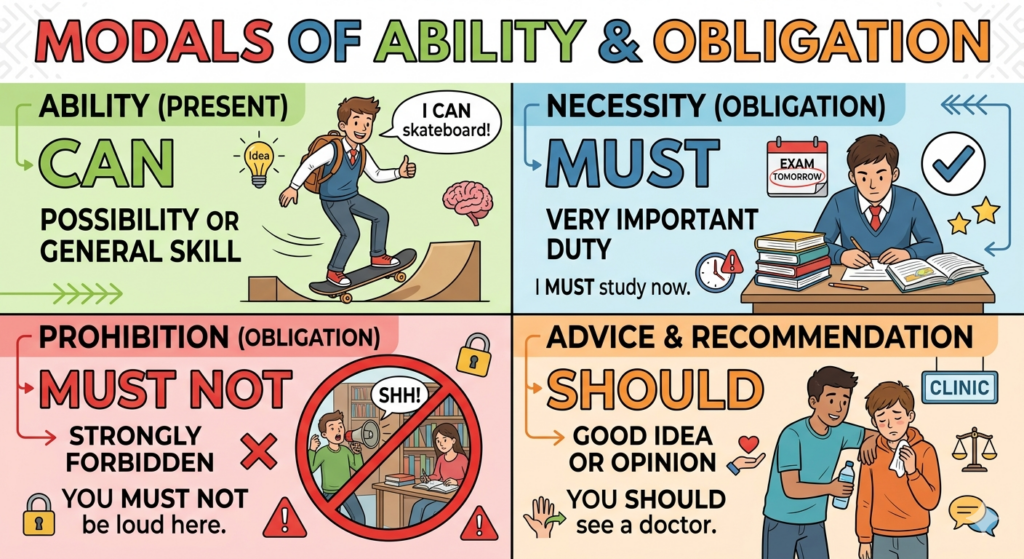
Part 4: Guided Practice (25 min)
Students complete a guided chart with two columns:
What I can do online and What I must do online.
Then they write six sentences using the vocabulary and grammar from the lesson. The teacher models the first two examples and then monitors while students complete the task. Students share their best sentence with the class, and the teacher gives immediate correction and reinforcement.
SESSION 2: CONSTRUCTION – REINFORCEMENT (40 min)
Part 1 – Sorting Activity (10 min)
The teacher gives students sentence strips with online actions. Students classify them into three categories: safe, unsafe, and uncertain.
Examples include: share your password, post a school photo, talk to an online stranger, use a private profile. This gives students a concrete context to continue working with the vocabulary.
Part 2 – Rule Poster (15 min)
In pairs, students create a mini classroom poster called Good Digital Rules. They must write at least four rules using must, must not, and can. For example: You must protect your password. You must not post private information. You can ask an adult for help. The teacher encourages correct structure and checks that students are applying the vocabulary from the lesson.
Part 3 – Quick Practice (15 min)
Students complete short sentence transformations. For example: It is necessary to protect your password becomes You must protect your password. The teacher checks answers with the class and reinforces the meaning of each modal.
Modals of Ability and Obligation
SESSION 3: CONSOLIDATION (80 min)

Part 1 – Review Activation (10 min)
The teacher reviews the key vocabulary and grammar through quick oral prompts. Students respond with complete sentences. For example: What can you do on a social network? or What must you not do online? This refreshes the language before the graded activity.
Part 2 – Quiz (25 min)
Students complete an individual quiz with multiple choice, matching, and sentence completion tasks. The quiz evaluates their understanding of the vocabulary and the use of can, must, and must not. The teacher collects the quiz as part of the grade.
The Leadership Lab: Personality & Rules
Part 3 – Application Task (30 min)
Students create a short written text titled My Responsible Social Media Guide. They write 80–100 words explaining what young people can do online and what they must or must not do to protect themselves. They are required to use at least five vocabulary words from the topic and at least four modal sentences. The teacher reminds students to organize their ideas clearly.
Part 4 – Reflection and Feedback (15 min)
Students exchange their texts with a partner and underline the modal verbs and vocabulary used. The teacher closes the class by reviewing common strengths and errors and reinforcing the importance of a positive digital footprint.
 RUBRIC:
Social Media Guide Rubric
NEE – Agregar el tipo de adaptaciones curriculares
Principio II: Pautas 6.1 – 6.3 – 6.4
Principio III: Pautas 7.1 – 8.1 – 9.1
ALUMNO 1: Constante monitoreo. Dar tiempo adicional para el desarrollo de la actividad y se reduce el número de ejercicios o se modifican los ejercicios con un nivel de dificultad reducido, de acuerdo con sus necesidades académicas.
ALUMNO 2: Constante monitoreo, Dar tiempo adicional para el desarrollo de la actividad y se reduce el número de ejercicios o se modifican los ejercicios con un nivel de dificultad reducido, de acuerdo con sus necesidades académicas.
ALUMNO 3: Constante monitoreo. Corroborar que el contenido entregado en clase haya sido comprendido por la estudiante mediante retroalimentación.